Saturday, 18 October 2014

New version and bug fixes for LED lights savings calculator application

Hi everyone, I found some naive bugs and some improvements which I could add to my application, therefore here they are:

Bug fixed:
-A bug which did not let the user calculate savings in case the plant was fully financed and yearly net savings were negative
-Other minor bugs

Functionalities added:
-Now you can select the number of yearly payments should you decide to ask for a full financing for your LED lights. You can leave this field blank, in that case a default number of payments is calculated according to costs and annual energy savings.

Click here to download the improved version.

Hope this was useful.

Monday, 13 October 2014

A simple program to calculate LED lights savings


EDIT: For the most updated application, please check the following page:
New version and bug fixes for LED lights savings calculator application


A week ago, a friend asked for a simple program which could help him calculate savings consumptions fast and give a glance at the overall picture.

If you did not know, by replacing your old bulbs and lamps with LED lights you can save up to 90% depending on the replaced lamp. For instance, if you replace neon with LED, savings are at least 45%, however they might be higher due to neon maintenance and hidden consumptions. If you replace incandescent bulbs with LED you save at least 80%.

Although initial price may be higher, LED lamps will surely pay off in the long run, since they are expected to last 50.000 hours!

This simple program lets you enter the data on your actual lights and the LED, then it calculates:
-Savings
-Savings at each year, for 10 years
-Amortization time if the lamps are paid in one shot
-Financing of the LED lamps with a basic constant pay-out mortgage assuming a 5% interest rate
-Immediate savings if the LED lamps are financed

Click here for the python source code. Again, the program is pretty simple since only a sketch is needed. It surely can be improved. If you have any suggestion please let me know.

Here are some screenshots and a calculation example

Immagine 2

The result of a simple replacement: 200 neon tubes with 200 LED tubes (assuming a cost of 26 euro/pc for LED tube.


Looks really like LEDs are the lights of the future.


Note: some data may be incorrect in your country (for example energy cost, tube cost, etc..), if you should ever use this program please check each data you input.

Sunday, 5 October 2014

A simple approximating algorithm for Financial Mathematics

Today while I was applying some of my knowledge of Financial Mathematics, I came across a weird problem. Ok I guess that’s not that weird after all, however I did not find at first, a formula or some trick to get to my goal and therefore I decided to use a simple approximating algorithm.

Say you have some data on a fixed-rate mortgage, a really basic mortgage where both the interest rate and the annual payment are fixed. By the way, if you’d like to know more on these mortgage check the wikipedia page here.

Apparently, the expression used to determine the annual payment, given the initial conditions, should be the following:

clip_image002

clip_image002[6]

clip_image002[12]

Now, suppose that you have everything, the annual constant payment (R), the initial capital (C0), the number of years (n) and you want to find the interest rate applied (i).

At first, it may appear difficult to deal with this problem analytically, so my first idea to get around this was the following: first, define k as the ratio of the initial capital to the annual payment C0/R, then rearrange the equation in terms of k as follows

clip_image002[14]

Now the problem sums up to this: find the i that satisfies the following system of equations

clip_image002[16]

Eventually, here is an algorithm in python to solve the system above


And here is the final plot


plot


Hope this was interesting. Here is Wolfram Alpha’s answer for your reference. For some reason it outputs 0.079 while I get 0.0724 which was the random rate I used to build this simple example. Perhaps some mistake occurred. If you find out please let me know.


Disclaimer
This article is for educational purpose only. The numbers are invented. The article may well contain mistakes and errors. You should never use this article for purposes different from the educational one. The author is not responsible for any consequence or loss due to inappropriate use.

Saturday, 27 September 2014

Approximating differential equation with Euler’s method

It looks like it’s time for differential equations.

So, let’s say that you have a differential equation like the one below and you are striving trying to find an analytical solution. Chill out, maybe take a walk outside or ride your bike and calm down: sometimes an analytical solution does not exist. Some differential equations simply don’t have an analytical solution and might drive you mad trying to find it.

Fortunately, there is a method to find the answer you may need, or rather, an approximation of it. This approximation sometimes can be enough of a good answer.

While there are different methods to approximate a solution, I find Euler’s method quite easy to use and implement in Python. Furthermore, this method has just been explained by Sal from Khan Academy in a video on YouTube which is a great explanation in my opinion. You can find it here.

Here below is the differential equation we will be using:

clip_image002

and the solution (in this case it exists)

clip_image002[5]

Here is the Python code algorithm. Note that the smaller the step (h), the better the approximation (although it may take longer).


Here are some approximations using different values of h:


5


05


005


Hope this was interesting.

Sunday, 21 September 2014

Generate slope fields in R and Python

Here is a short post on how to generate a quick slope field in R and Python.

If you do not know what a slope field is, well I am not the best person to explain it to you since it is a relative new concept for me as well. From what I’ve understood on the subject, a slope field is a graphical way to sort out a first-order differential equation and get a grasp at the solution without having to solve it analytically.

As the Wikipedia’s page says, “it may be used to qualitatively visualize solutions, or to numerically approximate them.”

In general, I feel safe saying that a slope field is some sort of a graphical approach to a differential equation.

Say you have the following differential equation:

clip_image002[8]

drawing the slope field would look something like this:
In Python (without arrows)
figure_1_3figure_2_1

and in R (with arrows, x=f and y=h)
Rplot

Of course these plots are just very quick and can be improved.

Here is the Python code I used to draw them.


And the R code


Here is a beautiful slope field for the following differential equation:

clip_image002[10]

In Python
x y


If you need a quick tool for drawing slope fields, this online resource is good, click here.


Hope this was interesting.

Tuesday, 9 September 2014

Multivariable gradient descent

This article is a follow up of the following:
Gradient descent algorithm

Here below you can find the multivariable, (2 variables version) of the gradient descent algorithm. You could easily add more variables. For sake of simplicity and for making it more intuitive I decided to post the 2 variables case. In fact, it would be quite challenging to plot functions with more than 2 arguments.

Say you have the function f(x,y) = x**2 + y**2 –2*x*y plotted below (check the bottom of the page for the code to plot the function in R):

im

Well in this case, we need to calculate two thetas in order to find the point (theta,theta1) such that f(theta,theta1) = minimum.

Here is the simple algorithm in Python to do this:

This function though is really well behaved, in fact, it has a minimum each time x = y. Furthermore, it has not got many different local minimum which could have been a problem. For instance, the function here below would have been harder to deal with.


im2


Finally, note that the function I used in my example is again, convex.
For more information on gradient descent check out the wikipedia page here.
Hope this was useful and interesting.


R code to plot the function

Gradient descent algorithm

Today I’m going to post a simple Python implementation of gradient descent, a first-order optimization algorithm. In Machine Learning this technique is pretty useful to find the values of the parameters you need. To do this I will use the module sympy, but you can also do it manually, if you do not have it.

The idea behind it is pretty simple. Imagine you have a function f(x) = x^2 and you want to find the value of x, let’s call it theta, such that f(theta) is the minimum value that f can assume. By iterating the following process a sufficient number of times, you can obtain the desired value of theta:

im

image


Now, for this method to work, and theta to converge to a value, some conditions must be met, namely:
-The function f must be convex
-The value of alpha must not be too large or too small, since in the first case you’ll end up with the value of theta diverging and in the latter you’ll approach the desired value really slowly
-Depending on the function f, the value of alpha can change significantly.

Note that, if the function has local minimums and not just an absolute minimum, this optimization algorithm may well end “trapped” in a local minimum and not find your desired global minimum. For the sake of argument, suppose the function below goes to infinity as x gets bigger and that the global minimum is somewhat near 1. With the algorithm presented here, you may well end up with x = –0.68 or something like that as an answer when you are looking roughly for x = 0.95.

im2

In this case of course, it is trivial to find out the value and you don’t even need derivatives. However, for a different function it may not be that easy, furthermore for multivariable functions it may be even harder (in the next article I will cover multivariable functions).

Here is the Python code of my implementation of the algorithm

Hope this was interesting and useful.

Thursday, 4 September 2014

Generate words through the use of Markov chains

In general, computer programs are believed to be bad at being creative and doing tasks which require “a human mind”. Dealing with the meaning of text, words and sentences is one of these tasks. That’s not always the case. For instance sentiment analysis is a branch of Machine Learning where computer programs try to convey the overall feeling coming from tons of articles.

But here we are talking a lot more simpler: by using Markov chains and some statistics, I developed a simple computer program which generates words. The model works as follow:
As a first step, the program is fed with a long text in the selected language. The longer the text, the better. Next, the program analyses each word and gets the probability distributions for the following:
-Length of the word
-First character (or letter)
-Character (or letter) next to a given one
-Last character (or letter)

Then, once gathered all this data, the following function is run in order to generate words:

theModel

Each part is then glued together and returned by the function.

On average, 10% of generated words are English (or French, German or Italian) real words or prepositions or some kind of real sequence of characters.

The most interesting aspect, in my opinion, is the fact that by shifting the language of the text fed into the program, one can clearly see how the sequences of characters change dramatically, for instance, by feeding English, the program will be more likely to write “th” in words, by using German words will often contain “ge” and by using Italian words will often end by a vowel.

Here is the code. Note that in order to speed up the word checking process, I had to use the NLTK package which is availably only in Python 2. To avoid the use of Python 2 you could check each word using urllib and an online dictionary by parsing the web page but this way is tediously slow. It would take about 15 minutes to check 1000 words. By using NLTK you can speed up the checking process.


Hope this was interesting.

Saturday, 30 August 2014

Markets, stocks simulations and Markov chains

This article is some sort of continuation from this one.

Our previous model for stock simulations did not take in account the following idea:
when a stock (or the market) is going up, then it should be (intuitively) at least, more likely that it will continue to go up. Or at the very least, as it is the case for a football game, it does not feel right to believe that the probability of either of the two possible outcomes is exactly 50%.

The idea behind Markov chains is really versatile, we can apply it also to the markets.
With a “bit” of study (I’m being sarcastic here), you can come up with something pretty complicated like this, however, the model I’m going to show here is much more naive and easier.

Suppose a Markov chain with two states, market up and market down. Once you found the probabilities of each state, you can easily simulate a random walk (based on a Markov chain of course).

Here is the code for this model:

The graphs below represent respectively, 2, 200 and 500 random paths.


2 random walks
2_random_waks


200 random walks


200_random_waks


500 random walks


500_random_waks


Hope this was interesting.


Disclaimer
This article is for educational purpose only. The numbers are invented. The author is not responsible for any consequence or loss due to inappropriate use. It may contain mistakes and errors. You should never use this article for purposes different from the educational one.

Monday, 25 August 2014

A first really shy approach to Machine Learning using Python

The day before yesterday I came across Machine Learning: WOW… I got stuck at my pc for an hour wondering about and watching the real applications of this great subject.

I was getting really excited! Then, after an inspiring vide on YouTube, I decided it was time to act. My fingers wanted desperately to type some “smart” code so I decided to write a program which could  recognize the language into which a given text is written.

I do not know if this is actually a very primitive kind of Machine Learning program (I somehow doubt it) therefore I apologize to all those who know more on the subject but let me dream for nowSorriso.

Remember the article on letter frequency distribution across different languages?? Back then I knew it would be useful again (although I did not know for what)!! If you would like to check it out or refresh your memory, here it is.

Name of the program: Match text to language

This simple program aims to be an algorithm able to distinguish
written text by recognizing what language a text
was written in.

The underlying hypothesis of this model are the following:
1. Each language has a given characters distribution which is different from the others. Characters distributions are generated by choosing randomly Wikipedia pages in each language.
2. Shorter sentences are more likely to contain common words that uncommon one.

The first approach to build a program able to do such a task was to build a character distribution for each of the languages used using the code in the frequency article. Next, given a string, (sentence) the program should be able to guess the language by comparing the characters distribution in the sentence with the actual distributions of the languages.

This approach, for sentences longer than 400 characters seems to work fine. However, if the sentence were to be shorter than 400 characters, a mismatch might occur. In order to avoid this, I have devised a naive approach: the shorter the sentence, the more likely the words in it are the most common. Therefore, for each language,a list of 50 most common words has been loaded and is used to double check the first guess based on the character frequency only in case the length of the sentence is less than a given number of characters (usually 400).

Note that this version of the program assumes that each language distribution has already been generated, stored in .txt format and it simply loads it from a folder. You can find and download the distributions here.


So far the program seem to work on text of different length. Here below are some results:


In these first two examples I used bigger sample sentences


Immagine 001


Immagine 002


In this last example, the sentence was really short, it was just 37 characters, something like: “Diese ist eine schoene Satze auf Deutsch”. In this case it was hard to draw a distribution which could match the German one. In fact the program found French and was really far away from the right answer indeed. The double-check algorithm kicked in the right answer (Lang checked).


Immagine 004


Hope this was interesting.

Weather forecast through Markov chains and Python

A Markov chain is a mathematical system that undergoes transitions from one state to another on a state space. It is essentially a kind of random process without any memory. This last statement, emphasizes the idea behind this process: “The future is independent from the past given the present”. In short, we could say that, the next step of our random process depends only on the very last step occurred. (Note that we are operating in discrete time in this case).

Let’s say that we would like to build a statistical model to forecast the weather. In this case, our state space, for the sake of simplicity, will contain only 2 states: bad weather (cloudy) and good weather (sunny). Let’s suppose that we have made some calculations and found out that tomorrow’s weather somehow relies on today’s weather, according  to the matrix below. Note that P(A|B) is the probability of A given B.


Markov chain weather visual

Therefore, if today’s weather is sunny, there is a P(Su|Su) chance that tomorrow will also be sunny, and a P(C|Su) chance that it will be Cloudy. Note that the two probabilities must add to 1.

Let’s code this system in Python:

Obviously the real weather forecast models are much more complicated than this one, however Markov chains are used in a very large variety of areas and weather forecast is one on them. Other real world applications include:
-Machine learning (in general)
-Speech recognition and completion
-Algorithmic music composition
-Stock market and Economics and Finance in general


For more information on Markov chains, check out the Wikipedia page.


If you are interested in Markov chains, I suggest you to check these two video series on YouTube which are (in my opinion) good explanations of the subject.
-Brandon Foltz’s Finite Math playlist, very clear explanation with real world examples and the math used is fairly simple. You just need to know a bit of matrices, operations on matrices and probability (but if you are here I guess you have no problems on this)
-Mathematicalmonk’s playlist on Machine Learning, where a more technical (formal) explanation is given in the videos on Markov chains, starting from here.


Hope this was interesting and useful.
-

Friday, 15 August 2014

Arduino module GUI (Beta version)

Hi everyone! I have just completed a first, very basic GUI to get the Aduino module (which by the way you can find here) more user friendly.

The GUI is still a “Beta” version since I have created it with PyQt4 which I started learning only 3 days ago. I bet there are plenty of features which could be improved. I am probably going to revise and update this GUI, however here is a first “raw” version which, as far as the connection and communication with Arduino Uno is concerned, works fine.

This application is for educational purpose only, any commercial purpose is excluded.

You can download the executable for windows here. For Mac and Linux users, the source code is included in the zip folder however I am not sure the program will work since I have no experience with those operating system and their USB settings. Feedbacks are much appreciated.

Here are some screenshots and some useful information:

This is the main screen. The three buttons at the bottom essentially sum up everything that this program should help you doing.

Immagine 001

First of all, you need to connect Arduino Uno to the USB port and load your program in.
Then you can click on connection on your GUI and click “Set up connection”. The default port is com3 and 9600 baud. You can easily change these default settings in the connection menu available in the GUI.

Immagine 002

Once the connection has been established you can start interact with Arduino Uno.

By clicking on the button “Read from Arduino” the program asks you how many lines to read, there’s still no default values however I suggest to read not more than 100 lines since the program might slow down or crash.

Immagine 003

By clicking on the button “Send to Arduino”, the program asks you to enter the data to send. You can enter one of the three data types showed below in the following form:
1. Integer: 2
2. Character: b
3. List: [2,3,4,5,6,7,8]

The list can be as long as you want it to be.

Immagine 004

Hope this is useful.

Wednesday, 13 August 2014

Controlling your Arduino Uno board with Python

Today I am going to talk about a particular topic which overlaps Arduino and computer programming.

Last month I was watching video about electronics and thinking about the solar controller which many solar stand alone kits use. For some reason they do not behave as they should (i.e. cut the power to the lights when the sun is rising and give full power in the evening). However, a far more important point is that for this kind of controller a centralized control system is not available. Therefore I had a great idea: let’s try to program a board such as Arduino, to do the job.

I bought an Arduino Uno, the basic model, which I guess is suitable for beginners as myself. You can check more details here.

Arduino is an open source project and can be programmed in a language which is similar to C. This point is fine, since I have some knowledge of C and can get by quite easily with beginner projects. Once the main code has been loaded on Arduino, you can interact with the board through the USB and the “shell”, and, for instance, give instructions to trigger some control flow structure such as if-if else- else. However, in some cases it does not work (still do not know why) or it is impractical, since you can enter only one value at time. It would be nice to control the board with some external tool which could let you write some script to execute. It turns out that there is a module which enables you to do such operations. This module is pySerial. It can be downloaded here and is available for Python 3 as well!

The module is great! It works really smooth and in a linear manner, as it should. However, Arduino accepts only raw bytes and binary code as input therefore some little amendments must be made to be able to communicate with it through Python 3. Note that there are some differences with Python 2 which I will not cover.

First of all, Python 3 wants naturally work with ASCII characters, therefore when sending an integer to Arduino Uno, our sweet board will understand anything but what we have sent. For characters such as ‘a’, the matter is somewhat at ease, since you just need to send the character with a b in front of it: b’a’. On the opposite side, when reading data, you need to convert it into a readable format. To solve all these “problems” I decided to build a simple class which essentially is a wrapper of some functions of Serial and can be used directly to send characters, lists and integers to Python. Perhaps I will add also the possibility to send floats and strings although I am not sure the latter can be send and understood from the board.

Here is a basic example of communication with Arduino Uno through Python 3.

First of all we need to load the following code to Arduino Uno. This simple code lights a LED light according to the value of  readData which is read from the USB port. Serial.print prints out the value of readData to the USB port.

For instance, to control the board in this case, you can use this Python code:

However, writing this code again and again is boring and can easily lead to mistakes. Therefore I decided to built a class whose name is Arduino


By creating an Arduino object using the ArduinoClass, you can call the following methods:

I am also working on a GUI with PyQt4 for this script. I will keep you posted.


The source code of the ArduinoClass is available here.


Hope this is useful!

Wednesday, 30 July 2014

(Naive) RSA encryption with Python

Please before continue reading, make sure to read the disclaimer at the bottom of this article.

RSA is a well-known cryptosystem used in many cases where secure data transmission is needed. It basically rely on the also well-known issue of factoring big numbers. As you may recall from high school, each number has a unique prime number factorization. This is the very strength of RSA. In order to decrypt a message encrypted with RSA you would need to factorize a REALLY BIG number and this problem may take a very long time to be solved, it may take so long that it becomes unpractical to be achieved.

If you want to get more on RSA click here.
Here is the algorithm carefully described.

I have always been fascinated by encryption and cryptosystems. For those who did not know, Alan Turing, during the Second World War, devised a machine which made it possible to decrypt Enigma code in relatively short time and therefore gain a significant advantage. This machine was basically the first computer. You can watch this incredible piece of history on you tube. Here are some interesting videos:

Numberphile Enigma video
An interesting documentary

Now let’s get to the necessary premises and the code!
First of all, to start off you need two big primes, p and q. I do not know how they usually get these primes (I haven’t covered it yet) but anyway, they are almost all you need to start your “naive” RSA encrypting system in Python. We will use small numbers for the sake of simplicity and this is basically one of the factors that led me to use the word “naive” since it could be easily broken in a short time.

Here is the result which should be printed out:


im


Therefore, hypothetically, Bob, who needs to send a message (512) to Alice, would use Alice’s public key to encrypt 512 and then send her the number 477. Alice would then use her private key to decrypt 477 and get back 512, the original message.


Hope this was interesting.


Disclaimer: This article is for educational purpose ONLY. If you need a security system you should ask to professionals who are competent in the field. The author of the article is by no means a professional or an expert in this field and might, therefore, make big mistakes. This code must NOT be used for anything other than educational purpose. The provider of this code does not guarantee the accuracy of the results and accepts no liability for any loss or damage that may occur as a result of the use of this code. Understanding and agreeing to the terms of this disclaimer is a condition of use of this code. By reading the article you confirm you have understood and will comply with this disclaimer.

Plain vanilla BlackJack simulation with R

Please before continue reading, make sure to read the disclaimer at the bottom of this article.

Here is a simulation I run with R in the same period I created the poker one.

I have just decided to call it plain vanilla since neither double down or split pairs are allowed. Rules are as basic as they can be.

The code looks like messy, I know, If I had to do it now, I guess I would do many things differently, however, the results looks fine, and the code runs fine as well, therefore it is not entirely to be thrown away I believe.

The simulation is divided in two parts. In the first one I looked for the probabilities for each possible event (that’s to say: “player wins”, “tie”, “dealer wins”). Since the code looks pretty hairy, many explanations are provided.

A small but important note: if you want to run the simulation, since it is a bit demanding computationally speaking, in order not to crash RStudio you may want to run a line a time and not the entire code all at once, or just maybe use only some functions, just be careful because since we run the simulation a big number of times and the functions are not the fastest to be run, your computer might complain a little.

Here is the code:

Let’s have a look at the results that we have got:


im1


By simply standing with a hand equal to 19, you can expect to win 59% of the times, and loose 28%. A tie is likely to occur 13% of the times.


Let’s now simulate 2000*100 games with a hand equal to 18 and 3 decks and then average the probabilities:


im5


im4


In this case the odds seem to be a lot worse than before, by just subtracting 1 point to the player’s hand we raised the probability of win for the dealer from 28% to 43.4%.


Why not run the simulation for each hand from 16 to 21 and then plot the results? Warning: your computer may yell at you after this demanding step!
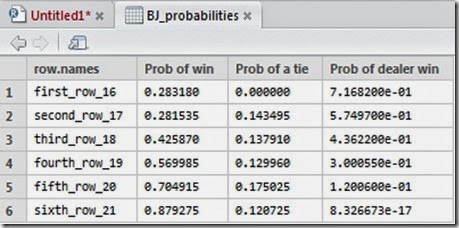

im6


As we could expect, as the player’s hand gets higher, the probabilities of winning increases. For some reason which I ignore, R did not print in plain the probabilities of winning for the dealer, however you can easily get them from the table above or by calculating for each row 1 - Prob of Win – Prob of a tie, since the three events should (must) sum up to one. It is interesting to note that the probability of a tie is more or less near 12-14% and that, as we expected, it is equal to 0 when the hand is equal to 16 (since the dealer must draw on 16 and therefore a tie is not possible).


Here are the plots:


Rplot


Rplot01


Rplot02


This is the end of part 1 of the simulation.


And now the second part. Here we want to know what are the probabilities of not bust when we draw 1 or 2 cards given a certain hand.

Let’s have a look at the new results we have got:
This is a hand we have got by asking 2 times card from a single deck.


im7


with a starting hand equal to (10,”A”) if we were to ask 2 cards, here are the probabilities that we should face:


im8


Eventually, we can compute the probabilities of “survival” and bust for each hand from 16 to 17 and plot the results.


im9


im10


Rplot03


Rplot04


Rplot05


Rplot06


The results looks pretty interesting and it is nice to see that the probability of bust if we ask for 1 card and our starting hand is 11 is 0 as we could easily predict, however, if we were to ask 2 cards, our chances of survival would suddenly drop to 25%. A big leap!


Hope this was interesting.


Disclaimer: This article is for educational purpose ONLY. Odds generated by this code are calculated by a random simulation. As such the odds will represent an approximation of the true odds. They might even be completely wrong or misleading. This code must NOT be used for anything other than educational purpose. The provider of this code does not guarantee the accuracy of the results and accepts no liability for any loss or damage that may occur as a result of the use of this code. Understanding and agreeing to the terms of this disclaimer is a condition of use of this code. By reading the article you confirm you have understood and will comply with this disclaimer.